
Topic
How To Match Your Lifestyle To A Sarasota Luxury Home


Luxury is more than a dramatic entry, a wide-water view, or a polished kitchen. The right home should make ordinary days feel easier, whether that means walking to dinner downtown, launching a boat before sunset, hosting visiting family, or enjoying quiet mornings behind a private gate.
For buyers comparing Sarasota Luxury Real Estate, The Laughlin Tanner Group offers a useful starting point through its Premier Sotheby’s International Realty presence and local focus on high-end residences across areas such as Downtown Sarasota, Bird Key, Lido Key, Longboat Key, Siesta Key, West of Trail, and Lakewood Ranch. Its Sarasota luxury property resources can help buyers begin comparing home styles and lifestyle settings before narrowing a search to individual residences.
In 2026, a thoughtful purchase means looking beyond photographs and the list price. Location, maintenance needs, insurance considerations, neighborhood character, association rules, and the condition of major systems can all shape the experience of owning a home in Sarasota, Florida.
Start With the Role the Home Will Play
Before touring properties, define how the home will be used. A home that works beautifully as a seasonal retreat may not be the best fit for a full-time household, and a stunning waterfront residence may require more hands-on care than an owner is willing to provide.
- Primary residence: Prioritize practical comforts, including storage, access to medical care, grocery options, commute patterns, and spaces that support everyday routines.
- Second home: Consider arrival and departure logistics, security, storm preparation, remote monitoring, and reliable maintenance support during periods of vacancy.
- Family gathering place: Look for separate guest rooms, flexible living spaces, a functional kitchen, ample parking, and outdoor areas that can accommodate different generations.
- Long-term investment: Review local rental restrictions, carrying costs, tax implications, insurance availability, and the features likely to remain appealing to future buyers.
Compare Sarasota Lifestyle Settings
Sarasota offers distinct ways of living within a relatively compact region. Two homes with similar square footage and price points can deliver entirely different daily experiences.
Walkable Urban Living
Downtown and bayfront-oriented areas can suit buyers who want restaurants, cultural venues, shops, parks, and waterfront activity close by. A condominium or townhome may be especially appealing for someone who prefers a lock-and-leave routine over the demands of a large yard and pool.
Beach and Coastal Living
Barrier-island and waterfront settings can be a strong match for buyers who place water access, beach time, boating, and sunset views at the center of their lifestyle. In return, buyers should be comfortable evaluating flood exposure, wind coverage, exterior maintenance, and the condition of features such as docks, seawalls, roofs, and impact protection.
Private Neighborhoods and Club Communities
Larger residential lots and amenity-rich communities may appeal to buyers seeking privacy, golf, fitness, dining, or an active social calendar near home. The key is to separate amenities you expect to use regularly from features that look attractive during a tour.
Open Land and Equestrian-Style Settings
For buyers who value room to spread out, east Sarasota County settings can offer a slower pace, greater separation from busy corridors, and more land. These properties may involve additional responsibility for landscaping, irrigation, gates, outbuildings, private roads, or acreage maintenance.
Picture a Normal Weekday, Not Only a Perfect Weekend
A useful way to test lifestyle fit is to imagine a typical Tuesday. Where will you get coffee, exercise, pick up groceries, meet friends, receive deliveries, or take a visiting guest? Consider travel times during both the busier and quieter parts of the year.
- Set a realistic preferred drive time to daily essentials and favorite destinations.
- Decide whether you want walking, cycling, boating, or driving to be part of everyday life.
- Think about how often you will entertain and how many overnight guests you expect.
- Identify the quiet you need at home, especially if you work remotely or plan to stay for extended periods.
For example, a buyer who enjoys downtown dining several nights a week may find that a smaller, low-maintenance residence near those activities creates more value than a larger home that requires a long drive for every outing.
Review the Full Ownership Cost
The purchase price is only one part of a luxury home decision. Ask for a clear estimate of recurring and potential expenses before writing an offer, then compare those costs with the time, convenience, and enjoyment the property is likely to provide.
- Property taxes and any applicable exemptions.
- Homeowners, wind, and flood insurance, where appropriate.
- Association fees, reserve contributions, and possible special assessments.
- Pool service, landscaping, pest control, security, utilities, and property management.
- Likely replacement needs for roofs, windows, HVAC equipment, generators, docks, seawalls, and other major systems.
- Travel and oversight costs for owners who live elsewhere part of the year.
A smaller home with transparent operating costs can be a more satisfying luxury purchase than a larger property whose upkeep consistently competes with the owner’s time and budget.
Evaluate Luxury Condominiums Carefully
Condominiums can simplify exterior maintenance, but ownership also means participating in a shared financial structure. Beautiful finishes and a desirable view should not replace a careful review of the building and association.
- Read the current budget, recent financial statements, and reserve information.
- Review board and membership meeting minutes for planned repairs, disputes, or recurring concerns.
- Ask about insurance coverage, deductibles, premium changes, and responsibility for losses.
- Confirm rules governing pets, rentals, renovations, guests, parking, and use of amenities.
- Ask whether inspections, maintenance projects, or capital improvements are pending or underway.
Prioritize Resilience and Long-Term Comfort
Durability supports both peace of mind and future marketability. Ask how a property has performed during heavy rain and storms, and have qualified professionals evaluate drainage, roof condition, windows, elevation, electrical systems, and water-facing structures where applicable.
Buyers can also consider how local infrastructure and public amenities may influence daily life over time. Sarasota County’s quality-of-life goals include priorities related to amenities, mobility, community safety, and stewardship, all of which can provide useful context when comparing locations.
A Simple Lifestyle-Matching Checklist
Complete this list before scheduling tours, then use it to keep each showing focused on your real priorities:
- Preferred setting: urban, coastal, private residential, club-oriented, or rural.
- Ideal travel time to dining, shopping, healthcare, work, and recreation.
- Primary residence, seasonal home, or future investment.
- Desired level of maintenance and comfort with managing vendors.
- Need for guest suites, home offices, hobby rooms, or multigenerational space.
- Importance of a pool, dock, beach access, golf, views, or walkability.
- Comfort level with association governance and recurring fees.
- Storm resilience, insurance, and property condition priorities.
- Expected ownership timeline and potential future resale considerations.
Choose the Home That Fits Real Life
The best Sarasota luxury home is not necessarily the largest, newest, or most expensive option. It is the one that supports your habits, gives you the right level of privacy and convenience, and remains comfortable to own over time. When lifestyle, location, condition, and ownership costs align, a home can feel luxurious long after the first showing.

The skincare industry has experienced significant growth in recent years, driven by increasing consumer awareness, changing beauty preferences, and growing demand for high-quality personal care products. As more brands enter the market, choosing the right manufacturing location has become an important consideration. India has emerged as a promising destination for skincare manufacturing, offering a combination of experienced professionals, diverse raw materials, advanced production capabilities, and competitive manufacturing costs.
From established beauty companies to startups and private-label brands, businesses are increasingly exploring opportunities to manufacture their skincare products in India. The country’s expanding cosmetic manufacturing ecosystem provides brands with the flexibility to develop products for both domestic and international markets.
A Growing Cosmetic Manufacturing Industry
India has developed a strong foundation in the cosmetics and personal care manufacturing sector. Over the years, manufacturers have gained experience in developing and producing different types of skincare products, including creams, moisturizers, face washes, serums, lotions, sunscreens, facial oils, and herbal formulations.
The growth of this industry has also encouraged manufacturers to invest in modern production facilities and product development capabilities. With experienced formulators, researchers, and production professionals, businesses can work with manufacturing partners to convert their product ideas into commercially viable skincare formulations.
Access to Diverse Natural Ingredients
One of India’s key advantages is its access to a wide variety of natural and botanical ingredients. The country has a long history of using plant-based ingredients in traditional beauty and wellness practices. Ingredients such as aloe vera, neem, turmeric, rose, sandalwood, coconut oil, and various plant extracts are commonly associated with Indian skincare traditions.
This availability of natural ingredients provides opportunities for brands interested in developing herbal, botanical, or naturally inspired skincare products. By combining traditional ingredients with modern cosmetic formulation techniques, manufacturers can help brands create products that appeal to consumers looking for innovative and ingredient-focused skincare solutions.
Competitive Manufacturing Costs
Cost efficiency is another important factor contributing to India’s popularity as a skincare manufacturing destination. Compared with many established manufacturing markets, India can offer competitive production costs due to its availability of raw materials, skilled workforce, established supply chains, and growing manufacturing infrastructure.
For startups and emerging beauty brands, this can be particularly valuable. Instead of investing heavily in their own manufacturing facilities and equipment, businesses can work with established manufacturers and allocate more resources toward product development, branding, marketing, and distribution.
Growing Opportunities for Private-Label Skincare
The growth of private-label skincare has further strengthened India’s position as a manufacturing destination. Many businesses want to launch skincare products under their own brand names without developing an in-house manufacturing facility.
Indian manufacturers can support such businesses through different stages of product development, from formulation and ingredient selection to manufacturing, filling, packaging, and labeling. This enables brands to develop products according to their target audience, brand positioning, packaging requirements, and pricing strategy.
Private-label manufacturing is particularly useful for ecommerce businesses, startups, salons, wellness companies, and established brands looking to expand their existing product portfolios.
Increasing Focus on Quality and Manufacturing Standards
Quality and safety are essential in the skincare industry because products are applied directly to the skin. As the Indian cosmetics sector continues to develop, manufacturers are placing greater emphasis on quality-control procedures, testing, documentation, and compliance with applicable requirements.
Brands should carefully evaluate a manufacturer’s facilities, quality-management processes, testing capabilities, ingredient sourcing, certifications, and regulatory practices before entering into a manufacturing partnership. Working with a manufacturer that follows appropriate quality procedures can help businesses maintain consistency across production batches and build consumer confidence.
Flexibility in Product Development
Another reason India is becoming an attractive destination for skincare manufacturing is the flexibility available to brands. Different businesses have different requirements depending on their target audience and market positioning. Some may focus on everyday skincare, while others may specialize in premium, herbal, natural, sensitive-skin, or specialized formulations.
Experienced manufacturers can work with brands to develop products that fit their specific requirements. This flexibility can be particularly important for businesses that want to differentiate themselves in an increasingly competitive skincare market.
Rising Demand for Indian Skincare Products
Consumer interest in skincare continues to grow across India, while Indian beauty products are also gaining visibility in international markets. Consumers are increasingly paying attention to ingredients, product quality, formulation benefits, and brand values when selecting skincare products.
The combination of India’s traditional knowledge of botanical ingredients and modern cosmetic manufacturing capabilities creates an opportunity for brands to develop products with a distinctive identity. This growing market demand is encouraging manufacturers to improve their facilities, expand their product-development capabilities, and explore new formulations.
Choosing the Right Manufacturing Partner
Although India offers significant opportunities for skincare manufacturing, choosing the right manufacturing partner remains an important decision. Businesses should consider factors such as manufacturing experience, formulation expertise, production capacity, quality-control procedures, customization capabilities, minimum order quantities, packaging options, and production timelines.
It is also important for brands to understand their own requirements before approaching a manufacturer. Having a clear idea about the product category, target audience, formulation preferences, packaging, expected production volume, and market positioning can make the manufacturing process more efficient.
The Role of Experienced Skincare Manufacturers
An experienced manufacturing partner can provide valuable support throughout the product-development journey. Companies such as Kamicka Organics can be explored by businesses looking for skincare manufacturing solutions and opportunities to develop products for their brands.
When evaluating skin care products manufacturers in india, businesses should not make their decision based solely on price. Manufacturing expertise, product quality, formulation capabilities, quality-control processes, customization options, and the ability to scale production are equally important considerations.
Conclusion
India is becoming a preferred destination for skincare product manufacturing because it offers a combination of manufacturing expertise, diverse natural ingredients, competitive production costs, private-label opportunities, and an expanding cosmetics ecosystem. These advantages make the country an attractive option for both emerging and established skincare brands.
As consumer expectations continue to evolve, brands need manufacturing partners that can provide consistent quality while supporting innovation and product development. By carefully researching potential manufacturers and evaluating their capabilities, businesses can establish reliable manufacturing partnerships and develop skincare products that meet the changing needs of today’s consumers.
You May Also Read : How Healthcare AI Chatbots Improve Patient Engagement Without Violating Privacy Laws
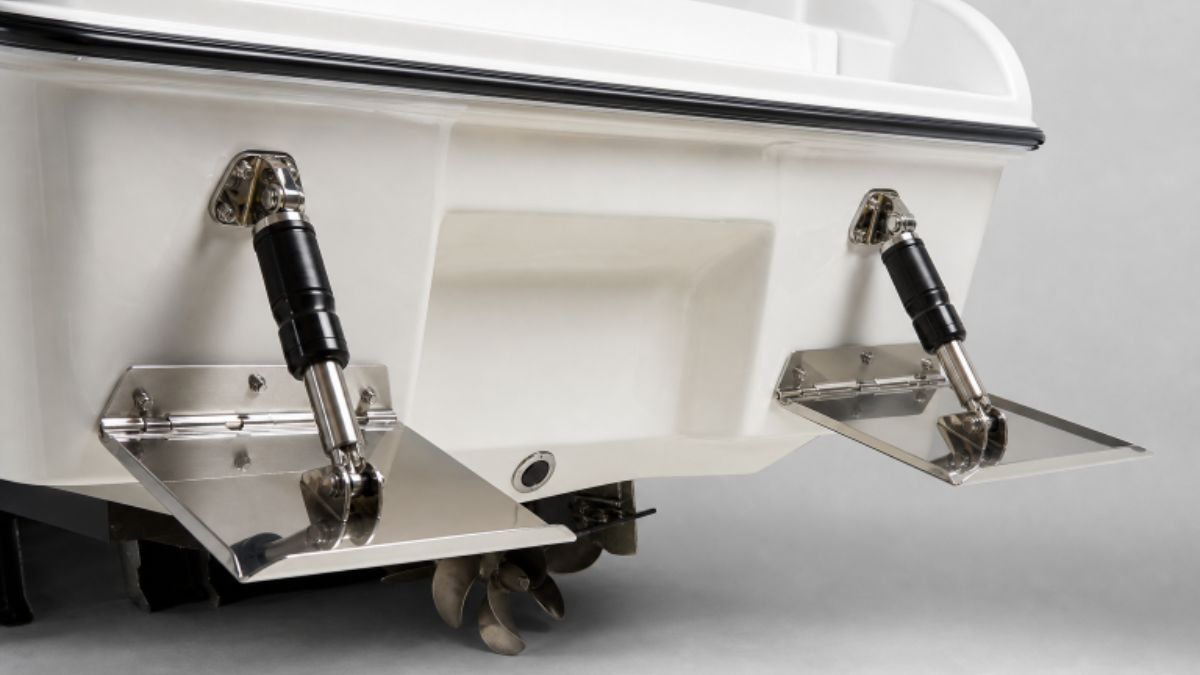
Trim tabs are a simple piece of equipment that noticeably affect how many powerboats run. Whether you operate a center console, fishing boat, runabout, or cruiser, they can help manage bow angle and side-to-side balance as speed, passenger position, fuel load, and water conditions change. Owners planning a transom repair or refit may also need compatible Fleming yacht parts before beginning related work.
They are not a substitute for proper loading, attentive driving, or slowing down when the water becomes rough. Instead, trim tabs are a fine-control tool that lets the operator make measured changes after the boat is safely underway and on plane.
Why Trim Tabs Matter On Modern Powerboats
On a planing hull, trim tabs influence pitch, which is the bow-up or bow-down angle, and roll, which is a lean to port or starboard. A better running attitude can improve forward visibility, reduce pounding in moderate chop, and make the boat feel more settled. As trim tabs change a boat’s running angle becomes clear through practice, it is easier to make adjustments that match the day’s load and sea state.
Tabs are especially useful when the boat has a recurring bow-rise issue while accelerating, when a crosswind causes a mild lean, or when passengers naturally gather on one side. They cannot correct every performance problem, however. A damaged hull, an unsuitable propeller, a serious weight imbalance, or a mechanical issue deserves separate attention.
How Trim Tabs Work
A conventional system includes two flat tab plates mounted at the transom, hinges, actuators that move the plates, and helm controls. Some systems also include position indicators or automatic controls. Lowering both plates creates lift at the stern, which brings the bow down while the boat is on plane.
For a side-to-side correction, deploy the tab on the high side of the boat to lower that side. For example, if the starboard side is riding high, a small starboard-tab adjustment can help level the hull. Control-pad directions vary by manufacturer, so confirm how your specific switches correspond to port and starboard before relying on them at speed.
Trim Tabs And Engine Trim Are Not The Same
Engine trim changes the angle of an outboard or sterndrive relative to the hull and affects how propeller thrust influences the boat’s attitude. Trim tabs primarily add lift at the stern and help control both overall running angle and lateral balance.
- Use engine trim to fine-tune bow lift once the boat is on plane.
- Use both tabs to reduce excessive bow rise or flatten the ride.
- Use one tab briefly to correct a mild list after checking the load first.
Avoid combining heavy tab deployment with excessive speed. Too much bow-down attitude can make a boat react poorly in steep waves, particularly when running down-sea.
A Simple Trim Tab Setup Routine
- Begin with the tabs raised. This provides a consistent, neutral starting point.
- Bring the boat onto plane. Use a steady throttle and maintain safe forward visibility.
- Lower both tabs in short taps. Pause after each adjustment until the bow settles into a flatter, controlled attitude.
- Fine-tune engine trim. Adjust gradually until the hull runs freely without an uncomfortable bounce.
- Correct a list only if needed. First, consider moving gear or passengers, then make a brief one-sided tab adjustment.
- Reassess often. Wind direction, wave height, speed, and fuel burn can change the best setting.
Adjustments For Common On-Water Problems
Excessive Bow Rise
Lower both tabs slightly and trim the engine in as appropriate for the boat. If the bow still blocks visibility, reduce speed. No tab setting makes limited visibility acceptable.
Listing To One Side
Check for an obvious loading cause before using the controls. If the boat remains mildly uneven, deploy the tab on the high side in a small increment, then wait for the hull to respond.
Porpoising At Cruise
Porpoising is a repeated bow-up and bow-down motion. Try lowering both tabs a little and trimming the engine in slightly. If it persists, consider load placement, engine setup, propeller selection, and the boat manufacturer’s guidance.
Head Seas And Following Seas
In head seas, a modest bow-down adjustment may soften the ride, but avoid forcing the bow deeply into steep waves. In following seas, use restraint with bow-down trim and keep enough bow lift to avoid bow steering. In either direction, reducing speed is often the most important adjustment.
Using Trim Tabs For Fuel Use
The most efficient setting depends on the hull, load, engine condition, speed, and water conditions. Test one change at a time in calm water, recording RPM, GPS speed, fuel flow data, if available, and tab position. More tabs are not automatically better, as unnecessary deployments can add drag.
Choosing, Installing, And Maintaining Tabs
Tab size should be chosen for the hull and transom, not boat length alone. Consider available transom space, hull shape, engine weight, normal load, and the manufacturer’s recommendations. Basic rocker switches suit many owners, while position displays and automatic systems can be useful for boats that frequently operate with changing loads or speeds.
Installation requires accurate measurement, symmetrical plate placement, protected wiring, and properly sealed fasteners and cable openings. An electric trim tab installation process also highlights the importance of checking behind the transom before drilling and placing helm controls within easy reach. Follow the instructions supplied with the exact system being installed.
Before each boating season, inspect plates, hinges, actuators, wiring, mounts, and sealant. Test movement at the dock; look for corrosion or loose fasteners; and investigate any tab that moves slowly, makes an unusual noise, or fails to hold its position. Stop using the system if hardware is loose or water intrusion around the transom is suspected.
Frequently Asked Questions
Should Both Trim Tabs Move Together?
Yes, when adjusting the boat’s overall bow angle. One-sided operation is generally reserved for correcting a mild lateral imbalance.
Can Trim Tabs Make A Boat Faster?
They may help the boat reach an efficient attitude sooner, but excessive deployment creates drag. The goal is a controlled, comfortable ride rather than a guaranteed increase in speed.
Can Tabs Fix Poor Weight Distribution?
They can reduce a mild list, but moving passengers or gear is the better first response when practical.
A Practical Test Plan For 2026
- Choose calm water with ample room and use the boat’s normal load.
- Record fuel level, passenger location, RPM, and speed.
- Run first with tabs raised, then lower both tabs in short steps.
- Test small port and starboard corrections separately, always returning to neutral between tests.
- Keep notes on the settings that provide the best visibility, comfort, balance, and control.
Conclusion
Trim tabs work best as precise control tools, not as emergency fixes. Start from neutral, make one small change at a time, and watch how the boat responds before making any other changes. With a deliberate routine, operators can develop settings that suit their particular hull, load, and local water conditions.
You May Also Read : How Sandy Springs Families Can Prove Nursing Home Negligence In Court

After an accident, the top priorities are safety, medical care, and ensuring the immediate facts are documented. Legal questions often come later, but waiting too long to recognize a complicated claim can make recovery more difficult. A consultation may be worth considering when injuries are serious, fault is disputed, or an insurance company is pressuring you to settle before you understand the full impact of the crash.
Reliable guidance can help people make calmer decisions during an overwhelming time. The legal resources available at chamlinlaw.com may be useful when an accident raises questions about insurance coverage, medical expenses, lost wages, or potential compensation. Every situation is different, so practical steps and timely advice matter.
The First Few Minutes After A Crash
At the scene, focus on preventing further harm. Call 911 if anyone may be injured, if traffic is blocked, if vehicles cannot be moved safely, or if there is a fire, a fuel leak, or another immediate danger. If it is safe and permitted, move out of traffic and exchange basic contact, vehicle, and insurance information with the other drivers.
Try not to argue about fault or make assumptions about what happened. Stress and adrenaline can affect memory, and early statements may be incomplete. A police report, photographs, witness accounts, and a later investigation may provide a clearer picture. If you are too injured or shaken to gather information, ask a passenger, witness, or responding officer for help.
Why Medical Care Should Come First
Some accident injuries are obvious immediately, while others develop over hours or days. Pain, dizziness, headaches, numbness, stiffness, sleep changes, and emotional distress should be taken seriously and discussed with a qualified medical professional. Emergency symptoms or worsening symptoms require prompt care.
Medical records can also provide an important timeline. Follow the treatment plan, attend recommended appointments when possible, and tell providers about all symptoms and limitations. This is not simply about a potential claim. Consistent care helps you understand your condition and gives providers the information they need to evaluate it properly.
How To Preserve Useful Evidence
Evidence can disappear quickly after a collision. Take photographs or video of vehicle damage, the road, skid marks, traffic signals, weather conditions, visible injuries, and anything else that may explain the event. Save the police report number, witness contact information, towing paperwork, repair estimates, and communications about the crash.
Do not assume that only photographs matter. Many vehicles have systems that record limited technical information around a collision. The National Highway Traffic Safety Administration explains that event data recorders can capture vehicle and occupant information for a brief period before, during, and after a crash. In a serious case, preserving the vehicle and seeking legal advice early may help prevent useful evidence from being lost.
What To Know Before Calling An Insurance Company
Most policies require prompt notice of an accident, so report the crash to the appropriate insurer without unnecessary delay. Stick to basic, accurate facts. Do not guess about speed, fault, the cause of the collision, or the full extent of injuries when you do not yet know those answers.
An adjuster may request a recorded statement, medical authorization, or settlement release. These documents can have consequences, particularly when treatment is ongoing or responsibility is disputed. It may be time to speak with a personal injury lawyer before providing a recorded statement or signing a release if you have substantial injuries, uncertainty about fault, or an offer that arrives before your prognosis is clear.
How To Track Bills, Missed Work, And Symptoms
Keep one organized folder, notebook, spreadsheet, or secure digital file for accident-related records. Include the following:
- Medical visit dates, provider names, prescriptions, and test results.
- Bills, insurance explanations of benefits, therapy expenses, and receipts.
- Missed workdays, reduced hours, and correspondence with an employer.
- Transportation costs and help needed with household or childcare tasks.
- A brief daily record of pain, mobility, sleep, mood, and activities you cannot do normally.
These notes can show how an injury affects daily life beyond the initial emergency visit. For example, someone may return to work but still struggle to drive, lift supplies, sleep comfortably, or care for a child. Details recorded close to the event are generally easier to remember accurately later.
Crashes That May Require Faster Legal Help
Some accidents become complicated quickly. Collisions involving commercial trucks may involve a trucking company, maintenance records, dispatch information, or multiple insurance policies. Rideshare accidents can involve app activity and different coverage questions. Pedestrian, bicycle, and motorcycle crashes may require careful investigation of visibility, roadway design, and vehicle movement.
It is also wise to seek legal guidance promptly after a hit-and-run, a crash involving an uninsured or underinsured driver, a collision with a government vehicle, or an accident that caused a fatality or permanent impairment. A lawyer can review the available facts, identify potential parties, explain next steps, and communicate with insurers while you focus on treatment.
Deadlines, Claim Choices, And Legal Questions
Deadlines for injury claims vary by state and can depend on the type of case. Claims involving government entities, wrongful death, minors, and insurance coverage disputes may have special notice rules or different filing periods. Do not rely on a general online timeline when a deadline could affect your rights.
A lawyer is especially helpful when an insurer denies responsibility, minimizes injuries, claims you were at fault, or refuses to offer enough to address documented losses. A consultation can also clarify the difference between making an insurance claim, negotiating a settlement, and filing a lawsuit. You do not need to decide immediately that litigation is necessary; ask informed questions.
Common Mistakes To Avoid
- Delaying medical care despite concerning symptoms.
- Failing to save photos, messages, damaged property, or paperwork.
- Posting detailed statements, photos, or opinions about the crash on social media.
- Giving rushed answers when you are unsure of the facts.
- Accepting a settlement before the injury and future care needs are understood.
- Ignoring emotional or psychological effects after a traumatic accident.
Avoiding these mistakes does not mean treating every accident as a lawsuit. It means protecting your health, keeping accurate records, and being cautious before making decisions that cannot easily be undone.
A Simple Post-Crash Checklist
- Get to safety and call 911 when needed.
- Exchange information and identify witnesses.
- Photograph the scene, vehicles, and visible injuries.
- Seek medical care and follow medical instructions.
- Report the accident under the terms of your insurance policy.
- Save bills, records, messages, and proof of missed work.
- Be careful with recorded statements, releases, and early settlement offers.
- Consult a personal injury lawyer when injuries are serious, facts are disputed, or the claim is complex.
The most important step after an accident is to protect your health. Once immediate needs are addressed, careful documentation and timely legal guidance can help you make decisions based on the full situation rather than pressure, uncertainty, or an incomplete understanding of your losses.
You May Also Read : Transforming Women’s Health: The Shift Toward Patient-Centered Care
-

 Business4 months ago
Image Search Techniques: Smarter Ways to Find Accurate Visual Results Online
-
Health3 months ago
Why Are So Many Autistic Girls and Women Still Missing Out on Early Identification?
-

 Lifestyle6 months ago
Sustainable Ways to Buy and Sell Antiques
-

 Sports3 months ago
Ultimate Pragmatic Juara100.org Medal Achievement Guide for Maximum Rewards
-

 Health4 months ago
Pravi Celer: Benefits, Uses, and How to Add It to Your Daily Diet
-

 Technology4 months ago
TabooTube: What It Is, How It Works, and Whether It’s Worth Your Time
-

 Business4 months ago
Understanding the Idaho Policy Institute Formal Eviction Rate 2020 Shoshone County: Housing Stability Insights
-

 Technology6 months ago
Top Features of ProgramGeeks Social You Didn’t Know About