Technology
Four Hundred Pages, Twenty-Three Plugins, and a Database on Life Support


The site went down on a Tuesday at 2:14 p.m., right in the middle of a product launch campaign, driving $40,000 in paid traffic. The CTO called the agency that built the original site five years earlier. They no longer supported WordPress.
That’s where the story of most enterprise WordPress failures begins: the moment a site built for one scale is forced to operate at another. The company in question had started with a clean 12-page WordPress installation. Over five years, three different developers had added service pages, landing pages, a knowledge base, a client portal, an events calendar, and a WooCommerce integration, each one bolting new functionality onto a foundation that was never engineered to carry it.
When the site crashed, it had 412 pages, 23 active plugins, and a database that took 9 seconds to return a homepage query. The immediate cause was a plugin conflict triggered by a routine PHP update; the underlying cause was years of accumulated architectural debt that no single developer had been tasked with addressing. Finding enterprise WordPress experts capable of diagnosing the full scope of the problem, from server configuration and database optimization to plugin rationalization, custom theme architecture, and scalable CMS infrastructure, took the company three weeks, and fixing it took four months.
Their story follows a pattern that repeats across industries whenever a WordPress site crosses the threshold from small business tool to enterprise-critical platform.
Year One Was Fine. That Was the Problem.
The original build was competent: a freelance developer created a responsive theme, installed a handful of reliable plugins, configured basic SEO settings, and delivered a site that loaded in under two seconds. For a 12-page site with moderate traffic, this was more than adequate. The problems began when the business grew faster than the site’s architecture could accommodate.
Year two brought a marketing team that needed landing pages built quickly. Rather than extending the custom theme, a page builder plugin was installed, adding 300KB of front-end JavaScript to every page load, including pages that didn’t use the builder. Nobody noticed because the site was still small enough to absorb the overhead.
Year three introduced e-commerce. WooCommerce brought its own database tables, JavaScript dependencies, and plugin ecosystem, and the developer who handled the integration was different from the one who built the original theme. Custom functions were duplicated across two different files with mismatched coding conventions, and neither developer documented which functions depended on which plugins.
By year four, the site had a client portal running on a membership plugin, an events system on a separate calendar plugin, and a knowledge base using a custom post type that a third developer had hardcoded into the theme’s functions.php file. Each addition worked in isolation. Together, they created a web of dependencies so tangled that updating any single plugin required testing against every other system on the site.
The Flexibility Trap
This is the enterprise WordPress problem. The platform is flexible enough to accommodate almost any feature request, which means it will absorb complexity indefinitely without warning you that the foundation is cracking. A site built for 50 daily visitors doesn’t announce when it’s struggling under 5,000; it just gets slower, one database query at a time.
The crash forced an audit that revealed the full extent of the damage. Of the 23 active plugins, seven duplicated functionality that could have been handled by two, and four hadn’t been updated in over 18 months, containing known security vulnerabilities. The database had grown to 2.3 GB, bloated with post revisions, transient data, and orphaned metadata from plugins that had been deactivated but never properly removed.
The homepage made 127 HTTP requests on load. The server’s PHP memory limit had been raised three times over the years to compensate for plugin bloat rather than addressing the bloat itself. The site’s Core Web Vitals scores had declined steadily for 18 months, and organic search traffic had dropped 34% in the same period, a correlation the marketing team hadn’t connected until the audit laid it out.
Rebuilding at a Different Altitude
Fixing a site at this scale required a fundamentally different skill set than the original build. The team that took over started with a full infrastructure assessment: server architecture, PHP version compatibility, database indexing, caching layers, CDN configuration, and SSL implementation. Before touching a single line of theme code, they spent three weeks mapping every plugin dependency and identifying which functions could be consolidated into custom code.
The plugin count dropped from 23 to 9. Functionality that had been handled by five separate plugins was rewritten as lightweight custom modules integrated directly into a new theme architecture. The database was cleaned, re-indexed, and optimized, shrinking from 2.3 GB to 800 MB, and page load time dropped from 9 seconds to 1.6 seconds.
The client portal, the e-commerce system, and the knowledge base all survived the rebuild. They were restructured to share a unified codebase with consistent naming conventions, documented dependencies, and version-controlled deployment. Future developers inheriting the project would find a system they could read, modify, and extend without guessing what might break.
The Scale Line Nobody Talks About
The distinction between building a WordPress site and engineering one becomes visible only at scale. A small site forgives architectural shortcuts because the performance cost is negligible. An enterprise site amplifies every shortcut into a compounding liability: the same platform that launches a bakery’s five-page website also powers newsrooms handling millions of monthly page views, and the engineering required for each is separated by an enormous gap in planning, testing, and structural discipline.
The company’s site has been stable for over a year, with traffic that has recovered and exceeded pre-crash levels. The marketing team deploys new landing pages independently, using a custom block library that replaced the original page builder. Plugin updates happen weekly in a staging environment, tested automatically before reaching the live site.
The Checklist You Wish You’d Had Sooner
For any organization running a WordPress installation that has outgrown its original architecture, these indicators signal that professional enterprise-level attention is overdue:
- Page load time exceeding 3 seconds, especially if it was faster at launch and has crept upward over time.
- Plugin count above 15, particularly if multiple plugins serve overlapping functions.
- The database size has grown significantly without a corresponding increase in actual content volume.
- Core Web Vitals failures that persist despite surface-level optimization efforts.
- Developer turnover without documentation, meaning no single person fully understands the current codebase.
- Update anxiety: the team avoids plugin or PHP updates because previous updates have caused unexpected breakage.
Each of these symptoms is manageable in isolation. Together, they describe a site that has crossed the enterprise threshold without enterprise engineering, and the longer the gap between those two realities persists, the more expensive the eventual correction becomes.
You May Also Read : Raussan Explained: Meaning, Uses, Benefits, and Why It Matters Today

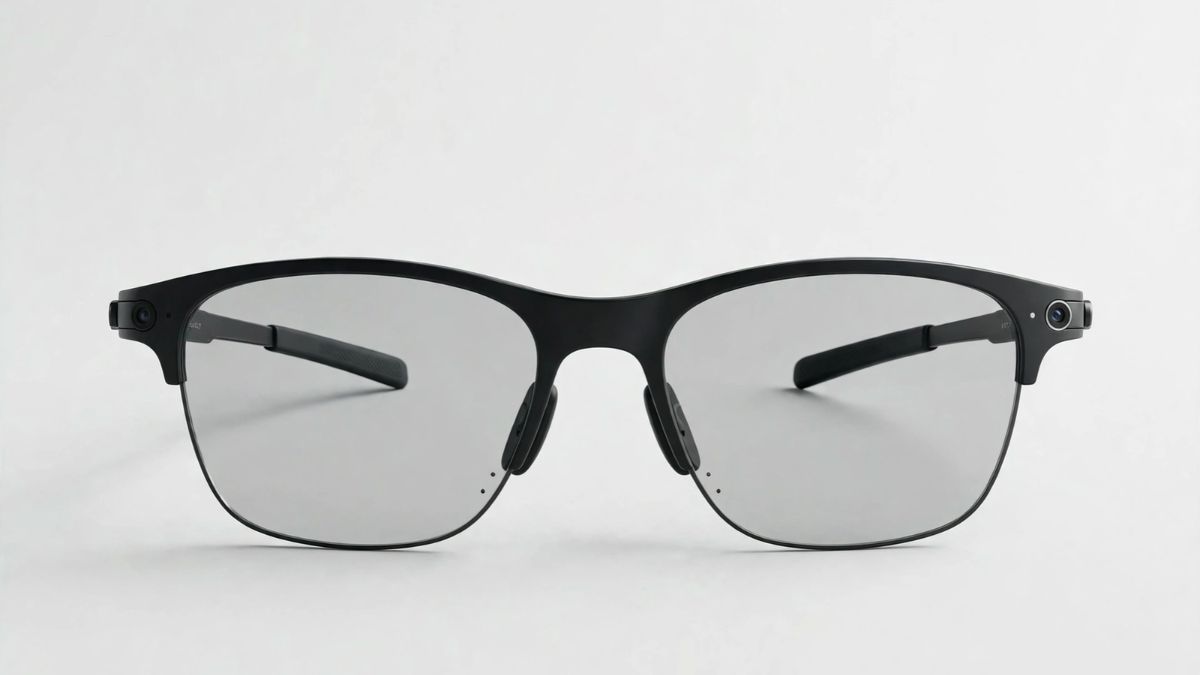
Eyewear has evolved significantly over the years. What was once considered an essential accessory for vision protection has now become an important part of personal style and everyday technology. From classic frames to innovative smart eyewear, modern consumers have more choices than ever. Among the latest developments in the eyewear industry, smart glasses have gained considerable attention for combining functionality, convenience, and fashion.
One of the most interesting innovations in this category is Ray-Ban Meta sunglasses. These smart glasses blend the iconic design of traditional sunglasses with modern technology, offering a new eyewear experience. Whether you enjoy capturing everyday moments, listening to music, or staying connected while travelling, smart eyewear introduces exciting possibilities.
What Makes Ray-Ban Meta Sunglasses Different?
Traditional sunglasses mainly protect your eyes from sunlight while enhancing your style. Smart eyewear takes this concept further by incorporating technology into the frame.
Ray-Ban Meta sunglasses feature built-in cameras, open-ear audio, microphones, and voice-controlled features. These functions allow users to interact with their surroundings without constantly reaching for their smartphones.
Some of their notable features include:
- Built-in Camera: Capture photos and videos from your point of view, making it easier to record everyday experiences.
- Open-Ear Audio: Listen to music, podcasts, and calls while remaining aware of your surroundings.
- Voice Assistance: Use voice commands to access supported features hands-free.
- Modern Connectivity: Connect the glasses to compatible smartphones for a more convenient experience.
- Stylish Designs: Enjoy familiar eyewear silhouettes with contemporary technology.
These features make smart glasses an interesting option for people who appreciate both fashion and technological innovation.
How Smart Eyewear Is Changing Everyday Experiences
Technology has become an integral part of daily life, influencing how people communicate, work, travel, and entertain themselves. Smart eyewear reflects this shift by making certain digital activities more accessible and convenient.
For travellers, built-in cameras can help capture memorable experiences without holding a phone. Content creators can record hands-free videos from their perspective, while music enthusiasts can enjoy audio through integrated speakers.
Smart glasses can also be useful during everyday activities such as walking, shopping, or exploring new places. Instead of constantly interacting with a smartphone, users can access selected features through voice commands.
However, it is important to remember that smart eyewear is not designed to replace smartphones. Rather, it complements existing technology by providing additional convenience.
Choosing Eyewear That Matches Your Personal Style
While technology is an important consideration, appearance remains one of the biggest factors when selecting eyewear. The right frame can complement facial features, enhance an outfit, and create a distinctive personal look.
When exploring different eyewear options, consider the following factors:
- Frame Shape
Different frame shapes suit different face structures. Square frames can create a defined appearance, while round frames offer a softer aesthetic. Aviator and rectangular designs remain popular choices for people who prefer versatile styles.
- Lens Quality
Choose lenses that offer suitable UV protection and visual comfort. Polarised lenses can also help reduce glare in appropriate conditions.
- Frame Material
Lightweight and durable materials can improve comfort, especially when wearing glasses for extended periods.
- Everyday Versatility
Consider whether the eyewear complements your regular clothing, professional outfits, and casual looks.
These factors are equally important when selecting traditional sunglasses or premium optical frames.
Luxury Eyeglasses: Combining Comfort, Quality, and Sophisticated Design
Apart from smart eyewear, premium optical fashion continues to attract consumers who value craftsmanship, comfort, and timeless aesthetics. Luxury eyeglasses are designed to offer more than basic vision correction. They combine carefully selected materials, distinctive frame designs, and attention to detail.
From elegant metal frames to bold acetate styles, premium eyewear collections offer options for different personalities and preferences.
Here are some reasons why people prefer premium eyewear:
- Superior Craftsmanship: Attention to frame construction and finishing creates a refined appearance.
- Comfortable Designs: Well-designed frames provide a comfortable fit for everyday use.
- Distinctive Styling: Premium collections feature different shapes, colours, and finishes.
- Long-Term Versatility: Classic designs can remain fashionable across changing trends.
- Brand Heritage: Established eyewear brands often bring years of design experience and expertise.
Whether you need prescription glasses for daily use or sunglasses for outdoor activities, investing in a suitable pair can improve both comfort and personal style.
Smart Glasses vs Traditional Sunglasses: Which Should You Choose?
The choice between smart glasses and traditional sunglasses depends on your lifestyle and requirements.
Smart glasses are suitable for people interested in hands-free photography, audio experiences, and connected technology. Traditional sunglasses, on the other hand, remain a practical choice for people who primarily want sun protection, comfortable lenses, and classic designs.
Before making a purchase, consider:
- Your primary purpose for buying eyewear.
- The importance of technology-based features.
- Your preferred frame style and fit.
- Lens protection and quality.
- Your budget and maintenance requirements.
There is no single option that works for everyone. The best choice is the one that meets your everyday needs while complementing your personal style.
Tips for Maintaining Your Premium Eyewear
Regardless of whether you choose smart glasses or traditional frames, proper maintenance can help extend their lifespan.
- Clean the lenses regularly using a suitable microfibre cloth.
- Avoid placing your glasses lens-side down on hard surfaces.
- Store your eyewear in a protective case when not in use.
- Keep your glasses away from excessive heat.
- Follow the manufacturer’s cleaning and maintenance instructions.
- Get the frame adjusted professionally if it becomes loose or uncomfortable.
For smart glasses, follow the manufacturer’s instructions for charging, software updates, and electronic component care.
Conclusion
The eyewear industry continues to evolve with changing consumer expectations and technological advancements. Smart eyewear demonstrates how traditional fashion accessories can become more functional through innovation, while premium optical collections continue to highlight the importance of quality, comfort, and design.
Ray-Ban Meta sunglasses represent an exciting combination of technology and iconic styling, making them an interesting choice for consumers exploring modern eyewear. At the same time, traditional premium frames remain relevant for those who appreciate timeless fashion and everyday practicality.
Ultimately, choosing the right eyewear is about finding the perfect balance between functionality, comfort, quality, and personal expression. Whether you prefer smart glasses or sophisticated optical frames, the right pair can become an essential part of your everyday style.

The digital storytelling landscape is undergoing a massive technical shift as native artificial intelligence moves from backend optimization directly into the user interface. In mid-2026, Meta rolled out its highly anticipated suite of generative creative features for Instagram Stories, anchored by its new proprietary engine, Muse Image.
Developed by Meta Superintelligence Labs, these updates move past standard visual filters to give creators real-time, text-to-graphic manipulation tools right inside the app. As competition for organic reach intensifies, leveraging these native features has become essential for rapid scaling.
For brands looking to instantly amplify their visual footprint alongside these tools, strategic growth shortcuts can help build a foundation; creators often choose to buy instagram followers from https://blastup.com/buy-instagram-followers to boost their initial social proof, allowing their newly optimized AI content to reach much larger audiences faster.
The Dawn of Muse Image: Unpacking Instagram’s 2026 Story Upgrades
The centerpiece of this update is the Muse Image engine, a generative AI model built natively into the Instagram Stories camera interface. Previously, creators had to rely on third-party design applications or external AI software to generate high-fidelity contents. Now, the internal camera allows for immediate, on-the-fly prompt execution.
Users can tap a dedicated AI effects icon to execute full image transformations, background replacements, and contextual object drops using descriptive language. The model introduces over 30 distinct native AI effects. These range from dynamic lightning shifts that alter the time of day in a photo to complex stylistic modifications that completely restyle a standard smartphone image into specialized art formats—such as hyper-realistic cinematic renders, oil paintings, or vector illustrations.
| Feature Metric | Standard Native Effects (Pre-2026) | Muse Generative AI Engine (2026) |
| Asset Origin | Pre-designed static overlays and asset filters | Real-time generative asset creation via text prompt |
| Environmental Control | Fixed color grading and basic spatial masks | Full lighting, object insertion, and style remapping |
| Processing Location | Local device graphic rendering | Cloud-assisted cloud rendering via Meta Labs |
| Customization Depth | Limited to slider opacity and asset position | Unlimited variations based on text prompt inputs |
How Creators are Using AI Tools to Drive Real-Time Engagement
The rollouts go far beyond just fun visuals; they fundamentally rewrite content workflows for digital media managers and standalone influencers. By eliminating the time-consuming step of asset production, the time from conceptualizing a brand story to hitting publish has dropped significantly.
Data from early adoption cycles indicates that accounts utilizing multi-layered AI effects experience higher viewer retention rates on sequential story frames. To maximize these engagement metrics, forward-thinking social media teams are adopting specific content strategies:
- Contextual Visual Continuity: Creators use text-based prompts to maintain an identical aesthetic across multiple, physically distinct environments. By prompting consistent style layers, a series of stories shot across different days can instantly look unified.
- Interactive Prompt-Driven Stickers: By embedding generative prompt results directly into engagement widgets, brands allow audiences to vote on or suggest changes to subsequent story designs, creating a dynamic, real-time feedback loop.
- Rapid Asset Prototyping: Small business owners can take basic, unedited product photos on a smartphone and instantly generate professional, clean lifestyle backgrounds right inside the story editor, cutting out the need for complex studio lighting setups.
Navigating the Privacy Shift: The Mechanics of “Sharing and Reuse”
While the creative tools offer incredible flexibility, the deployment of the Muse model has sparked a massive conversation regarding user data permissions and digital privacy rights. In its initial rollout, Meta designed the system around an automated opt-in architecture. This means public account photos and reels are automatically indexed by the system to assist other users with inspiration and style references unless the account owner manually turns it off.
For professional creators, managing these parameters is critical to protecting their original intellectual property and personal likeness. Taking control of your data privacy requires adjusting specific backend settings within the native application layout.
Settings and Activity → Sharing and Reuse → Meta AI Permissions
Once inside this specific directory, users will find explicit options labeled “Allow people to reuse your content on Instagram and with AI features at Meta”. Toggling these controls off for both individual posts and video reels removes those specific creative assets from the shared public training pool. Teen accounts feature stricter privacy protections by default, but verifying these configurations remains a crucial best practice for brand managers overseeing corporate assets.
The Future of Short-Form Storytelling: What’s Next?
Instagram’s quick shift toward deeper AI integration points to a future where creators move completely away from static templates. The platform is already working on native AI video generation features, showing that short-form storytelling will soon be completely customizable, interactive, and built on real-time prompts.
View more Instagram growth resources to explore additional strategies that complement these emerging trends. As these tools advance, the top accounts on the platform won’t just be the ones with the largest production budgets. Instead, success will belong to creators who blend smart prompt engineering with authentic storytelling, all while keeping a close eye on their brand privacy settings.
You May Also Read : Understanding Waveform Analysis in Electronic Testing

The TikTok world has now changed. The time of very polished videos and perfect lifestyle content is almost gone. Quick lip-syncing trends that feel empty are also not as popular now. People feel tired of seeing perfect lives and perfect posts. They do not use the app to see people who look perfect all the time. A new way of using the app is here. The TikTok algorithm now rewards videos where you feel a real, raw, and honest human connection with others the most.
If you want your content to get noticed this year, you need to drop the big company scripts and start sharing more real stories. But even if you get good at telling your story, creators and brands still have to keep steady, everyday engagement. This tells the platform’s system that people care about the posts. Using something like auto likes that activate on every upload can help your page get moving fast as soon as you post. This gives your very real and easy-to-connect videos the best chance to go right on the For You Page (FYP).
The Death of the “Aesthetic” and the Rise of “Reali-TEA”
TikTok’s official trend forecasts now use the term “Reali-TEA” to talk about the main change in what people do on the app. People are not looking to run away into some dream world. Instead, they want things that feel real, honest, and let them feel like they are part of people’s lives.
- The Imperfection Premium: Videos with small mistakes, untidy spaces, or honest “get set with me” confession talks do much better than big-budget studio videos.
- The “Evidence Economy”: People are very doubtful. They ask to see “proof of process.” When you show the messy real-life side of things, like starting a business, learning something, or not getting a recipe right, it builds a deep trust that polished ads just can’t give.
Data Info: A look at e-commerce in 2026 showed this. User-Generated Content (UGC)-style videos, which are lo-fi and feel like a friend made them, had a much better return. They got an average of 55% higher ROI than the usual fancy brand ads.
How the 2026 Algorithm Rewards Relatability
The system behind TikTok has changed a lot over time. It used to be a simple interest system. Now, it is much smarter. The algorithm does not focus on surface-level numbers. Instead, it pays more attention to strong signs of how people really feel and act.
[Algorithmic Weight Hierarchy in 2026]
- Watch Time & Completion Rate (Highest)
- Video Saves & Shares
- Replays & Long-form Comments
- Superficial Likes (Lowest)
Now, the platform tracks how long people watch very closely, down to every small moment. People will watch a video all the way to the end if the video has a strong story, one that sets up the scene, introduces a problem, and provides a resolution. This can assist in spreading the video a great deal more throughout TikTok. TikTok is now favoring longer videos, as long as 60 to 180 seconds, allowing creators the time to tell full stories.
Learn how to create your story with the authentic 3-step framework.
As there’s a new wave of business and storytelling, the old methods of video production need to be replaced. Bring your content to life and go through these steps that prioritize people:
-
Unfiltered Hook: First 3 Seconds
Begin with a statement that is very open and raw, or start by getting into what happened. Do not start slow. For instance, you can say: “I got wrapped up in my business and nearly ruined this morning, and here is how it happened.
-
Visual Pattern Interrupts: The Messy Middle
Share the struggle. Make your editing as simple as possible. Make easy jump cuts or raw voiceovers. Update camera angle or introduce new background text every 10-15 seconds. This helps to lock the viewer’s attention on your video.
-
The Talkative Payoff: Call to Conversation
It isn’t advisable to use a regular or strong call to action such as “follow for more”. Rather, pose a question that begins with “Why,” “How,” or “What. You can also pose a question that is near someone. This makes the viewer think that they want to come to the comments section and post their opinions.
Blending Narrative Power with Algorithmic Strategy
In the end, the people who win with views are the ones who care about both feelings and good planning. A good script keeps the viewer watching. Using helpful tools like auto likes that activate on every upload helps you build a strong base of steady activity. When the platform sees quick likes and comments in the first hour, it starts to share your real, long videos with many more people who are likely to care. When you mix real human stories with smart growth plans, your content can do well on today’s social media.
You May Also Read : What Is Incestflox? Understanding the Online Search Term and Internet Safety
-

 Business6 months ago
Image Search Techniques: Smarter Ways to Find Accurate Visual Results Online
-
Health4 months ago
Why Are So Many Autistic Girls and Women Still Missing Out on Early Identification?
-

 Lifestyle7 months ago
Sustainable Ways to Buy and Sell Antiques
-

 Sports5 months ago
Ultimate Pragmatic Juara100.org Medal Achievement Guide for Maximum Rewards
-

 Technology5 months ago
TabooTube: What It Is, How It Works, and Whether It’s Worth Your Time
-

 Technology8 months ago
Top Features of ProgramGeeks Social You Didn’t Know About
-

 Health6 months ago
Pravi Celer: Benefits, Uses, and How to Add It to Your Daily Diet
-

 Education4 months ago
How You Structure Dissertation Research to Build Strong Academic Arguments