
AI
Manage Multiple Avatars in One Video via an AI Character Tool

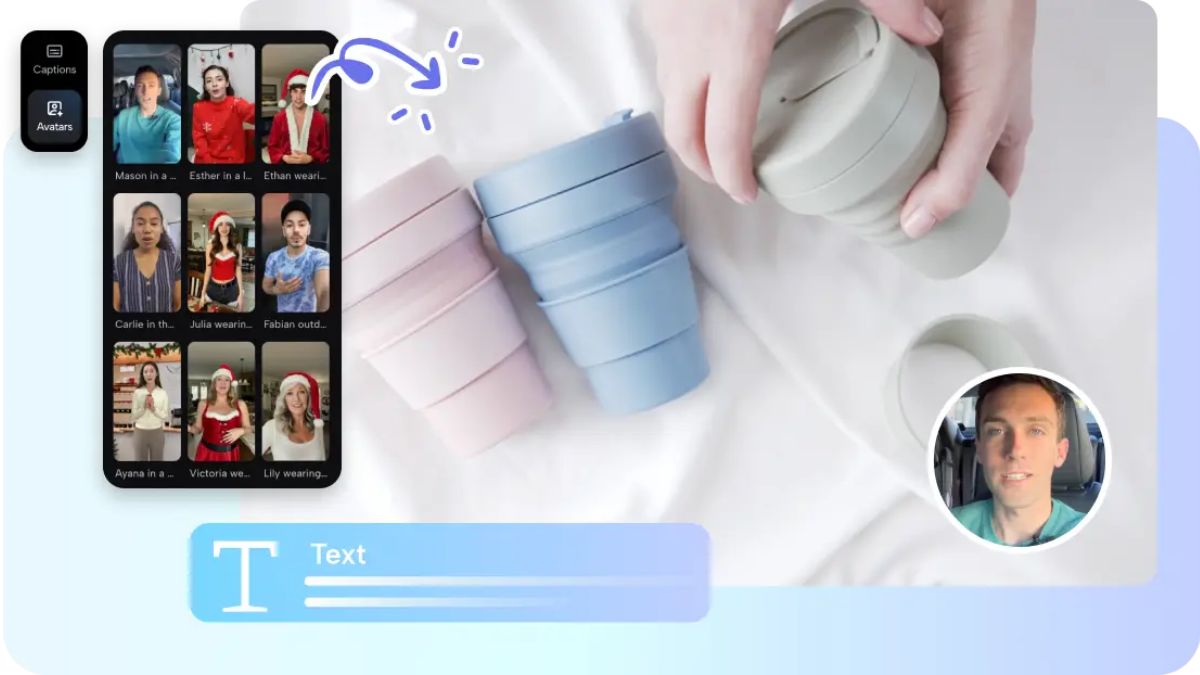
With Multi-avatar video production, you can create a coherent video featuring multiple virtual presenters in a single video. Collaborative formats are becoming more popular among brands and creators, as they help create greater clarity and engagement across platforms. Pippit easily accommodates structured avatar management and synced dialogue development without the need for complex production tools. This is for marketing, education, and entertainment applications. Having several characters helps deliver messages more strongly and holds audiences’ attention while keeping the visual quality of the content professional across a variety of styles.
Understanding Multi-Avatar Video Production
Multi-avatar Video Production is the process of integrating multiple virtual presenters into a video production environment. This allows for dynamic discussions, panel sessions, and storytelling in chunks in various industries. It is used by businesses to create marketing, training, and customer-interaction materials. It is applied to educational platforms to provide interactive and scenario-based learning. The method provides greater clarity than a single presenter’s videos,, as each avatar conveys a specific message. Pippit helps in this respect by efficiently organizing roles and dialogues. The AI character system allows you to ensure the avatar’s actions and speech synchronization are synchronized from one scene to another. Manual coordination work is minimized while maintaining presentation quality, thanks to AI. This makes it more scalable for content creators who need to produce videos regularly.
Strategic Benefits of Using Multiple AI Avatars
There are several avatars available for different types of storytellers, each with benefits for the content strategy. The more characters there are, the more variety in content in the same video. The dialogue and variety of imagery increase engagement. Each avatar has one topic/role, which makes it easier to segment information. Conversational formats can more easily engage viewers, and they are more effective at helping them retain important information. Pippit makes these benefits possible by simplifying avatar coordination and content structuring. The AI video generator speeds up the production process and ensures uniformity among characters and scenes. This enables the production of interactive material for marketing, education, and social communication at scale. This enhances workflow optimization, enabling creators to focus on delivering their message without getting bogged down in technical details.

Structuring Avatar Roles Within a Single Video
For multi-avatar videos, there needs to be a clear distribution of roles among the virtual characters. The primary presenter sets the agenda and takes control. Supporting avatars elaborate on subtopics or give context explanations. Expert Avatars offer expert knowledge on topics. Interviewers continue the conversation and maintain audience interest. Educational discussion formats: A variety of perspectives for understanding. Pippit facilitates the structured assignment of these roles in a single video workflow. Role planning helps to minimize confusion and enhance narrative coherence. The character distribution is balanced across avatars, meaning their respective characters are all useful without redundancy. This structured method aids viewers’ comprehension and upholds expert storytelling standards across all kinds of content.
Steps to manage multiple avatars in one video via an AI character tool
Step 1: Open multi-avatar creation workspace
- Log in to Pippit and go to the main dashboard to start a video project.
- Click “Video generator” from the side menu.
- Select “Avatar video” under Popular tools to begin multi-avatar setup.
- This enables you to create videos with multiple speaking characters on a single timeline.
Step 2: Select and assign multiple avatars with scripts
- Browse “Recommended avatars” inside “Choose avatar”.
- Filter avatars by gender, age, industry, name, scene, pose, outfit style, or figure.
- Select multiple avatars and click “Edit script” to assign dialogue to each one.
- Add multilingual text and ensure proper lip-sync across all avatars.
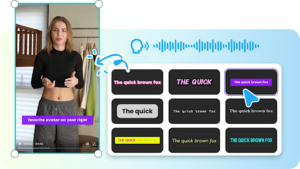
- Adjust “Change caption style” to keep captions consistent across characters.
Step 3: Sync avatars, refine interactions, and export video
- Click “Edit more” to manage interactions between multiple avatars.
- Adjust speaking order, timing, voice pacing, and facial expressions.
- Add overlays and background music to unify the scene.
- Click the “Export” tab once everything is aligned.
- Choose “Publish” for social sharing or “Download” to save in your preferred format, resolution, and quality.
Coordinating Avatar Interactions Effectively
With several avatars, a structured dialogue flow, and precise timing control is necessary to coordinate them. There is a specific time period for each Avatar to avoid overlapping with other Avatars. If the characters are well-positioned, it will create visual balance. Predictable and smooth transitions help to make conversational exchanges more natural. The scenes are organized in a logical sequence to ensure a smooth flow between topics. Pippit enables interaction design that is synchronized for seamless multi-character presentations. With careful planning, one can maintain viewers’ interest and ensure the discussion is understandable. Each avatar can make meaningful contributions without disrupting the narrative flow, maintaining consistent pacing.
Multi-Avatar Management Essentials
- In multi-avatar storytelling, character roles are defined to improve clarity.
- Have clear roles for each avatar in the delivery structure.
- Ensure that dialogue is not out of order, meaning no part of the dialogue should overlap.
- Make sure that characters are distinctly separated and presented in different visual styles.
- Develop scenes in a logical order to aid in telling the story.
- Timing: Sync to create balanced and natural interaction.
Maintaining Consistency Across Multiple Characters
In the professional world, consistency is an important aspect of multi-avatar production. All characters’ speeches should be coherent, that is, they should all be of the same style. The caption design should remain consistent throughout the video. Smooth Scene Transitions between conversational parts. If the avatars use the same color scheme, the brand is presented more strongly. Balanced screen presence means that no one character dominates the content. Pippit also has consistent formatting tools, which allows you to ensure the same quality across all the scenes. This structured process helps establish trust with the audience and increase content recognition.
Editing Techniques for Smooth Avatar Collaboration
Split-scene organization can be used to break down multi-avatar stories into their parts. Adjustments of character positioning improve visual balance and readability. Transition coordination – to make the transitions from one speaker to another. Perspective changes for dynamic viewing angles for improved engagement. Layer management lets you control the text, visuals, and animations. Pippit’s editing features enable precise interactions with avatars without compromising the storytelling. These techniques improve production quality and help hold the viewers’ attention and interest over the complex discussions.
Scaling Content Production with Multi-Avatar Setups
Multi-avatar setups can extend content production capabilities across several formats. Panel-style discussions can be more easily simulated with Structured Avatars. Interview and debate formats give realistic dialogue flow to improve engagement. Using segmented explanations with different characters is helpful in educational conversations. Multilingual presentations with flexible voice and text enhance the global reach. It’s a much bigger story when two or more perspectives intersect in one video. Pippit supports scalable workflows, ensuring quality across large volumes of content. This helps improve efficiency and enables more dynamic, richer video experiences.
Conclusion
Multi-avatar video production is more engaging, conveys more effective messages, and offers greater flexibility for storytelling. Cross-coordination of virtual characters across industries is in place, positively affecting content quality. Organized workflows and synced presentation tools allow Pippit to handle complex avatars with ease. Consistent results and easier production and scaling of collaborative video formats. This helps meet the demands of modern content creation and enhances dynamic, interactive digital experiences.
You May Also Read : Complete Guide to BK 182: Meaning, Uses, and Practical Applications
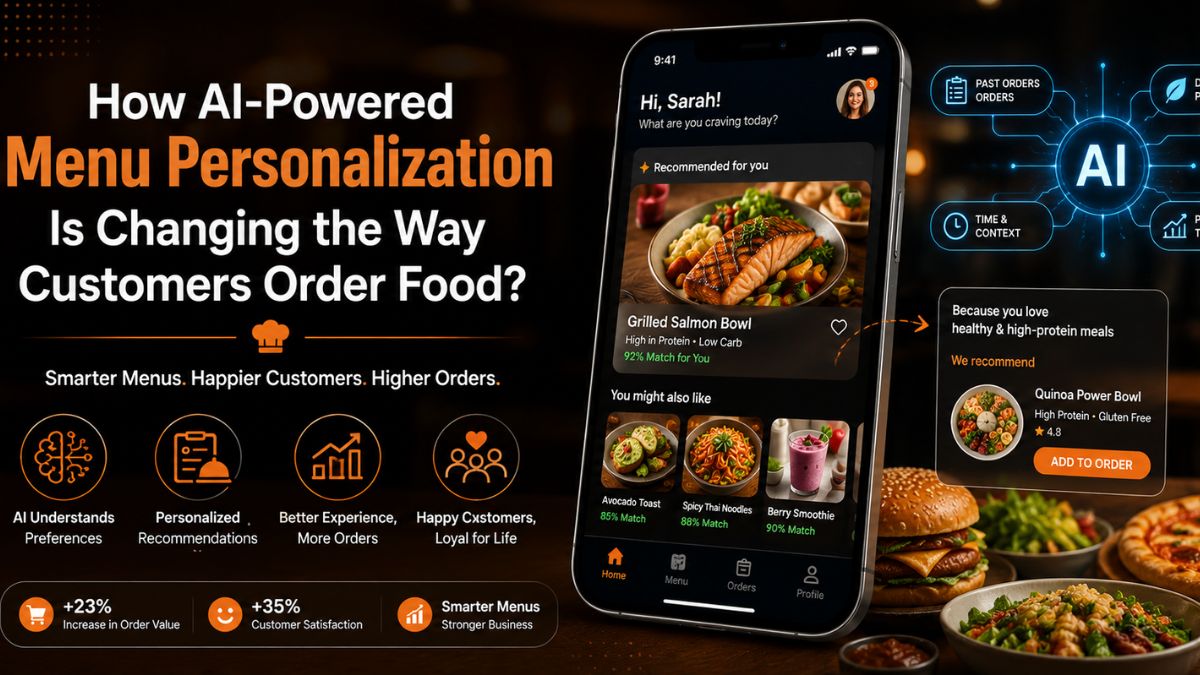
Choosing what to order should be easy. However, many customers spend too much time browsing digital menus. A large number of options often leads to decision fatigue. This can slow down the ordering process and affect the overall experience.
Artificial intelligence is helping restaurants solve this challenge. Instead of displaying the same menu to everyone, AI can recommend dishes based on customer preferences, past orders, and ordering habits. This creates a more relevant and engaging experience for every user.
As food ordering becomes increasingly digital, personalization is becoming a key expectation. AI-powered menu personalization is changing how customers discover, select, and purchase food.
In this article, we will explore how this technology works, how it influences ordering behavior,
and why restaurants are investing in it.
What Is AI-Powered Menu Personalization and How Does It Work?
AI-powered menu personalization is a technology that tailors menu recommendations to individual customers. Instead of showing the same dishes to everyone, it uses customer data to display more relevant options.
The system learns from past orders, browsing behavior, food preferences, and spending patterns. Some platforms also consider factors such as location, weather, and ordering time.
This helps customers discover suitable menu items faster while creating a more engaging and convenient ordering experience.
Delivering personalized experiences has become a priority for modern restaurants. This is why many businesses turn to restaurant app development services to add AI-powered recommendation capabilities to their ordering platforms.
How Does It Work?
The following steps showcase the working of AI-powered menu personalization.
1. Customer Behavior Analysis
The system reviews previous orders, searches, and browsing activity. This helps identify food preferences, spending habits, and ordering patterns for each individual customer.
2. Data Processing and Learning
AI analyzes collected information and finds meaningful connections. With every interaction, the system improves recommendations and better understands changing customer preferences.
3. Personalized Menu Recommendations
Based on customer insights, the platform highlights relevant dishes first. This reduces menu browsing time and helps customers make decisions faster.
4. Continuous Recommendation Improvement
The system tracks customer responses to recommendations over time. This feedback helps refine future suggestions and maintain personalization accuracy.
How AI-Powered Menus Are Changing Customer Ordering Behavior?
As AI becomes more advanced, it is changing how customers interact with digital menus. Businesses looking to build a restaurant app are increasingly adopting personalization features to improve ordering experiences.
Instead of showing every menu item equally, AI helps customers discover relevant choices faster. This makes ordering more convenient while encouraging greater engagement with the platform.
1. Personalized Recommendations Reduce Decision Fatigue
AI studies customer preferences and ordering history to highlight relevant dishes first. Customers spend less time searching through menu categories and more time making confident ordering decisions.
2. Dynamic Menus Improve Food Discovery
AI can rearrange menu displays based on customer behavior and real-time conditions. This helps users discover suitable dishes that may otherwise remain unnoticed during browsing.
3. Smarter Suggestions Increase Order Value
AI recommends complementary items that match a customer’s current selection and preferences. These suggestions feel useful and often encourage customers to add more items.
4. Faster Decisions Create Better Experiences
Relevant recommendations reduce unnecessary browsing and simplify the ordering journey. Customers find suitable meals quickly, leading to smoother experiences and higher satisfaction.
Benefits of AI Menu Personalization for Restaurants
The impact of AI-powered menu personalization extends beyond customer convenience. It also helps restaurants improve sales, strengthen customer relationships, and make better business decisions. By delivering more relevant recommendations, restaurants can create value for both customers and the business.
1. Higher Customer Satisfaction
Customers prefer experiences that feel relevant to their needs and preferences. Personalized menu suggestions help them find suitable options faster. This reduces frustration and creates a smoother ordering journey from start to finish.
2. Increased Average Order Value
AI can recommend side dishes, beverages, and desserts that complement selected meals. Because these suggestions match customer interests, they often lead to additional purchases. This helps restaurants increase revenue without using aggressive sales tactics.
3. Stronger Customer Retention
When customers consistently receive relevant recommendations, they are more likely to return. Personalized experiences create familiarity and convenience. Over time, this strengthens customer loyalty and encourages repeat ordering behavior.
4. Better Use of Menu and Sales Data
AI systems continuously analyze customer interactions and purchasing patterns. These insights help restaurants understand popular items and changing preferences. Businesses can use this information to improve menus, promotions, and future marketing strategies.
Real-World Applications and Emerging Trends
AI-powered personalization is now actively shaping how modern restaurant platforms operate. It is no longer experimental and is being used in practical, high-impact ways across digital ordering systems.
1. Smart Promotion Placement in Apps
Restaurants now use AI to decide which offers appear first. High-conversion items are shown based on user interest patterns. This improves visibility of the right promotions at the right time.
2. Context-Based Menu Adjustments
Menus can shift based on time of day or customer context. For example, lunch and dinner views may differ for the same user. This makes ordering more aligned with real-time intent.
3. Behavior-Driven Layout Changes
Some apps adjust how menu categories are arranged. Frequently engaged sections appear higher on the screen. This improves navigation efficiency without changing menu content.
4. AI-Assisted Inventory Alignment
AI is also used to align recommendations with available stock. This helps restaurants reduce waste and improve operational planning behind the scenes.
5. Next-Gen Conversational Ordering
New systems are exploring chat-based ordering experiences. Users can describe what they want in natural language. The system then builds a suitable order automatically
Challenges Restaurants Should Consider in AI-Powered Menu Personalization
AI-powered menu personalization brings clear advantages, but restaurants must also understand its limitations. Addressing these challenges early helps ensure smoother adoption and better long-term results.
1. Data Privacy Concerns
Restaurants collect and process customer data to improve personalization. This creates responsibility for protecting sensitive information and using it ethically. Clear policies and secure systems are necessary to maintain customer trust and avoid misuse concerns.
2. Accuracy of Recommendations
AI systems depend heavily on clean and updated data. If customer data is missing or outdated, recommendations may become irrelevant. This can lead to poor user experience and reduced confidence in the ordering system.
3. High Setup and Integration Efforts
Implementing AI features requires technical integration with existing restaurant platforms. It may also involve system upgrades and coordination between different tools. This process can take time and careful planning to execute properly.
4. Maintaining User Trust
Customers need to understand how recommendations are generated. Without transparency, AI suggestions may feel unclear or intrusive. Restaurants must ensure users feel comfortable and confident while interacting with personalized systems.
Conclusion
AI-powered menu personalization is changing how customers interact with food ordering platforms. It helps users find relevant dishes faster and improves overall ordering convenience. At the same time, restaurants gain better insights into customer behavior and preferences.
This technology is also shaping the future of digital dining experiences. From smarter recommendations to more adaptive menus, the impact is becoming more visible across the industry. However, success depends on responsible use of data and proper system integration.
As restaurants continue to evolve digitally, AI will play a stronger role in shaping customer choices. Personalized ordering is no longer optional. It is becoming a key part of modern restaurant experiences.
You May Also Read : Harouxinn Explained: Meaning, Online Presence, and Why People Search for It
The Rise of Intelligent Digital Experiences
Businesses today are operating in an increasingly digital environment where customer expectations continue to grow. Users expect fast websites, personalized experiences, seamless mobile interactions, and instant access to information. To meet these expectations, organizations are turning to artificial intelligence (AI) to improve how they build, manage, and optimize their digital platforms.
AI-powered WordPress development and mobile application development are helping businesses create smarter digital experiences while improving operational efficiency and customer engagement. By combining intelligent automation with modern development practices, companies can adapt faster and remain competitive in an evolving marketplace.
AI Is Changing the Way Businesses Build Websites
A business website is often the first point of interaction with potential customers. Modern websites must do more than display information, they need to engage users, personalize experiences, and support business goals.
Today, businesses that choose to build a website on WordPress can take advantage of AI-powered capabilities that improve both user experience and website performance. AI tools can assist with content recommendations, automated customer support, SEO optimisation, website personalisation, and visitor behaviour analysis.
WordPress continues to be a preferred platform because of its flexibility, scalability, and extensive ecosystem of integrations. Combined with AI technologies, businesses can develop websites that deliver more meaningful interactions and adapt to customer behavior in real time.
Creating Personalized Customer Experiences
One of the most significant benefits of AI-powered development is personalization. Businesses can use AI to understand customer preferences, analyze browsing behavior, and deliver customized experiences.
For WordPress websites, AI can recommend content, personalize product suggestions, automate communication, and improve customer engagement. Instead of offering the same experience to every visitor, businesses can create tailored journeys that increase satisfaction and encourage conversions.
This level of personalization helps strengthen customer relationships while improving overall website performance.
Mobile App Development Is Becoming Smarter
Mobile applications have become essential tools for businesses looking to connect with customers and streamline internal operations. AI is enhancing mobile applications by making them more intelligent, responsive, and user-focused.
AI-powered mobile apps can include features such as predictive search, personalized recommendations, chat functionality, voice interactions, automation, and advanced analytics.
These capabilities improve user engagement while helping businesses gain deeper insights into customer behavior and preferences. AI-driven mobile applications also support operational efficiency by automating repetitive tasks and enabling faster decision-making.
Why Businesses Are Investing in Integrated Digital Solutions
Modern customers interact with businesses across multiple platforms. A website and mobile app should work together to create a connected and consistent user experience.
Businesses are increasingly adopting integrated digital strategies that combine AI-powered websites with mobile applications. This approach ensures users receive a seamless experience whether they access services through a browser or mobile device.
An integrated digital ecosystem also improves data collection, customer understanding, and business performance measurement.
Choosing the Right Development Partner Matters
Successful AI implementation requires more than selecting the latest technology. Businesses need a development partner that understands both technical requirements and business objectives.
Working with the best app development company can help organizations design scalable solutions that align with long-term growth goals. Experienced development teams can create intelligent mobile applications and integrate them effectively with WordPress websites to deliver consistent digital experiences.
From strategy and design to deployment and ongoing optimization, the right partner ensures businesses maximize the value of their technology investment.
The Future of Digital Business Is AI-Driven
AI-powered WordPress and mobile app development are reshaping how businesses operate, engage customers, and deliver services. Intelligent automation, personalized experiences, and connected digital platforms are becoming essential for long-term success.
Businesses that invest in AI-enabled websites and mobile applications today position themselves to respond faster to market changes and evolving customer expectations.
Whether you plan to build a website on WordPress or develop an advanced mobile solution, combining AI with modern development practices creates opportunities for innovation, efficiency, and sustainable business growth.
You May Also Read : Trucofax Explained: What It Is, How It Works, and Why It Matters in 2026

The entertainment and software industries are experiencing a massive shift toward spatial computing and complex interactive applications. Modern digital experiences, from augmented reality marketing campaigns to high-end virtual reality training simulations, require thousands of unique spatial objects. Historically, producing these complex visual assets demanded intense human labor, specialized software licenses, and months of dedicated modeling time. Today, algorithmic synthesis is fundamentally disrupting this outdated workflow. A highly sophisticated example of this evolution is Neural4D, an advanced mathematical engine jointly developed by Nanjing University, DreamTech, Oxford University, and Fudan University. This robust architecture enables modern studios to deploy reliable AI 3D generation for interactive media, effectively bypassing the limitations of manual digital sculpting and allowing for rapid deployment directly into modern rendering environments.
The core operational advantage of the Neural4D ecosystem lies in its ability to process basic visual data and synthesize mathematically precise spatial depth. Early attempts at automated media generation often produced chaotic triangle meshes that were entirely unsuitable for professional interactive rendering. By prioritizing a proprietary quad-dominant topological framework, Neural4D ensures that generated digital objects maintain their structural integrity and behave predictably during complex physics interactions. Consequently, technical art teams can rely on these generated sequences for populating background scenery, establishing architectural scale, and designing detailed interactive props without requiring senior technical artists to perform extensive manual mesh retopology.
The Bottleneck of Manual Asset Generation
To understand the full impact of algorithmic synthesis, system architects must evaluate the inherent limitations of standard manual production in the media sector. A typical interactive software development cycle requires meticulous attention to detail from character artists and environmental designers. Technical operators must manually construct the base geometry, painstakingly unwrap the UV coordinates, and paint multiple high-resolution texture maps to ensure the model reacts accurately to dynamic lighting setups. Each of these necessary steps demands highly specialized artistic skills and introduces significant labor costs to the studio timeline.
When an independent media agency needs to populate an entire virtual environment with unique debris, architectural details, and consumer products, the traditional pipeline quickly breaks down. Relying on manual modeling for thousands of minor background elements results in prohibitive financial costs and extensive launch delays. The infrastructure of a modern interactive studio must account for rapid scalability, and manual production simply does not scale efficiently under tight commercial deadlines. Implementing an automated algorithmic approach mitigates these structural bottlenecks by handling the foundational geometry generation phase entirely through centralized backend code execution.
Architecting a Smarter Studio Strategy
Integrating an automated generation engine directly into a commercial development pipeline changes how organizations approach virtual storytelling. Instead of treating spatial models as bespoke, inflexible digital art pieces, technical directors can handle them as dynamic data generated on demand. When a production team integrates Neural4D into their daily operations, they experience a measurable increase in content velocity. The system processes standard 2D visual reference data and outputs fully structured polygonal meshes that adhere strictly to the intended physical dimensions of the original reference object.
This technical consistency is highly beneficial for enterprise-scale operations. Standardization across thousands of digital props is essential for ensuring that visual messaging remains cohesive across different media platforms, from high-end console hardware to standard mobile web browsers. By establishing a robust automated pipeline, companies can continuously update their media repositories without incurring the massive financial overhead traditionally associated with physical laser scanning and slow manual editing.
Technical Capabilities for Enterprise Architecture
Understanding the underlying mechanics of modern generative systems is essential for engineering teams tasked with evaluating potential studio integrations. The latest iteration of the computational engine, Neural4D-2.5, introduces several important technical refinements designed specifically for demanding production environments and complex corporate architectures:
- Automated Quad-Dominant Topology: The system maintains structural cohesion across the entire asset. This predictability prevents rendering artifacts, ensuring a smooth visual experience for users exploring the interactive environment.
- High-Fidelity Texture Generation: The underlying engine fully supports physically based rendering principles. This ensures that generated assets react accurately under various simulated lighting conditions within the software engine.
- Optimized UV Unwrapping Algorithms: Models are generated with clean, non-overlapping UV layouts. This automated process allows technical artists to make rapid material adjustments without rebuilding the underlying digital map.
- Scalable Batch Processing Workflows: Cloud-based infrastructure allows studio users to process multiple visual references simultaneously, streamlining the bulk creation of massive open-world environments or commercial product catalogs.
Synergizing Internal Production with External Communities
While proprietary generation engines are powerful, the most sophisticated media productions often combine custom-generated objects with existing structural environments. Virtual production studios frequently require complex background geometry, such as structural beams, natural rock formations, and ambient lighting fixtures, to anchor their generated scenes realistically. A fragmented content strategy can lead to rendering conflicts and mismatched visual styles across different studio departments.
To solve this, organizations are increasingly looking toward centralized repositories and community-driven platforms to source foundational scene geometry. For example, leveraging the popular community platform DIY3D to download free 3D assets allows corporate creators to efficiently expand their internal asset libraries. Professionals can use these sourced structural elements as base layers or environmental references before placing their custom-generated interactive products within the scene. DIY3D provides an active environment where professionals can share their created components, exchange best practices, and collaborate on complex digital projects. This cross-functional sharing drastically reduces redundant modeling efforts and helps build a much more cohesive enterprise production ecosystem.
Real-World Applications in Rapid Prototyping
Various sectors closely aligned with interactive media are rapidly adopting advanced reconstruction techniques to improve their overall operational efficiency. Independent software studios actively utilize these generated models to create rapid gameplay prototypes. These quick iterations allow interactive designers to test complex level designs with representative placeholder assets, significantly enhancing the mechanical testing process and ultimately driving faster project approvals.
Virtual reality developers employ the same technology to quickly populate massive digital environment prototypes with highly accurate representations of real-world objects. In spatial computing and modern digital twin pipelines, rapid prototyping heavily benefits from the unique ability to quickly digitize physical mockups into workable digital environments. By leveraging the massive computational power of Neural4D, engineering teams can iterate on physical design concepts much faster, effectively bridging the historical gap between conceptual artwork and complex digital simulations.
Optimizing the Future of Virtual Production
The integration of advanced generative artificial intelligence provides a clear and measurable operational advantage for technical development teams and creative studios alike. As the internet continues to evolve into a spatial medium, the tools we use to manage digital content must evolve accordingly. Relying entirely on outdated manual modeling workflows is no longer a viable strategy for organizations aiming to build immersive, engaging interactive experiences at scale.
By fully automating the foundational steps of spatial media generation, forward-looking organizations can drastically reduce their product development cycles and better optimize their internal resource allocation. As the global demand for immersive interactive content continues to grow at an unprecedented rate, adopting robust, academically backed algorithmic frameworks like Neural4D will be a defining factor for businesses aiming to scale their digital production capabilities efficiently. Establishing a modern, automated pipeline today ensures that enterprise media platforms remain flexible, scalable, and ready to meet the interactive demands of tomorrow.
You May Also Read : Glossywise com: A Complete Guide to Understanding the Platform and Its Digital Value
-

 Business4 months ago
Image Search Techniques: Smarter Ways to Find Accurate Visual Results Online
-
Health3 months ago
Why Are So Many Autistic Girls and Women Still Missing Out on Early Identification?
-

 Lifestyle6 months ago
Sustainable Ways to Buy and Sell Antiques
-

 Sports3 months ago
Ultimate Pragmatic Juara100.org Medal Achievement Guide for Maximum Rewards
-

 Health4 months ago
Pravi Celer: Benefits, Uses, and How to Add It to Your Daily Diet
-

 Technology4 months ago
TabooTube: What It Is, How It Works, and Whether It’s Worth Your Time
-

 Business4 months ago
Understanding the Idaho Policy Institute Formal Eviction Rate 2020 Shoshone County: Housing Stability Insights
-
 Technology6 months ago
Top Features of ProgramGeeks Social You Didn’t Know About